Showing posts with label Web. Show all posts

January 16, 2011

Browsers War


With more and more Google Chrome apps and extensions coming out it's time to take a look on the war between the browsers. I know the apps are mainly made for the Google Chrome OS, but I can't see ChromeOS taking a  major place in the OS market in the near future, which means most of the apps and extensions will be used on Google's browser , Chrome.
I've looked on W3Schools browser statistics for the past year, according to W3Schools five browser control the market Microsoft's IE, Mozila's Firefox, Google Chrome, Safari and Opera. Since Safari and Opera control between 2-4 percent, I won't be taking a look at them. According to W3Schools IE and Firefox have been loosing the battle mainly to Google's Chrome, IE has been dropping in a rate of 0.961 percent a month and Firefox 0.209 percent a month for the last eleven month, mean while Chrome has been climbing in a rate of 0.882 percent a month. In these rates Chrome will over take IE in less then six month and Firefox in less then twenty two month. The battle between IE and Chrome is close, six month is just over the corner, Microsoft is taking about IE 9, but looks like it's all ready too late. On the other hand twenty two month is a long time almost two years in this time Firefox can stop the it's dropping, probably with Firefox 4, but still it's hard to predict
A lot of writers, when writing about browsers, write on things like better support of CSS or how it works with HTML5 (hell, some people don't even know what a browser is). Most users don't care about those things, the two things that matter the most, in this order are speed and safty and in the meanwhile looks like IE is loosing and Chrome is winning, Firefox had developed a lot of speed problems but looks like version 4 had solved part of that.
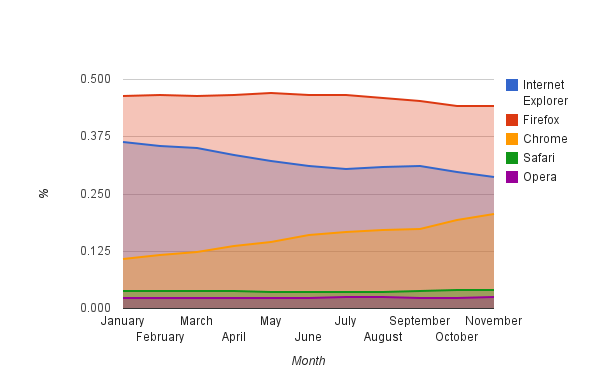

Browser percentage (January-November 2010)
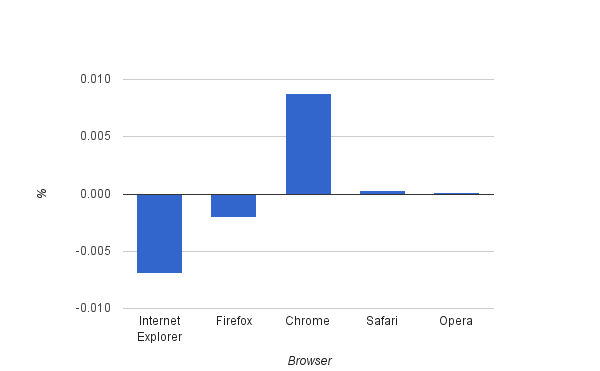
 Change rates
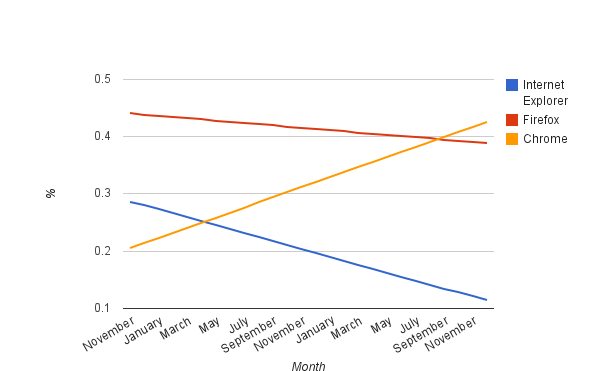
Change rate crossing (November 2010-November 2012)

You can check the numbers at this Google Docs spread sheet.


Bookmark and Share

August 10, 2010

I can't follow “Who to follow”


Twitter just added a new feature they called it “Who to follow”, a nice idea, Twitter finds you people who have the same fields of interest as you have. I liked that idea, I wrote in the past about LazyFeed I like the idea that applications suggest you what to read or follow according to your choices in the past. In Twitter's case, people I follow. But “Who to follow” has some problems:
  • The list shrinks when you choose to follow some body, no new person is added, so the more you follow, the shorter you list becomes. 
  • The same with the “Hide” button, every time you decide to hide so one, the list shrinks. 
  • The list never changes, it's always the same people, so once I check it, I chose who to follow, and thats it. The “Who to follow” finished its job. A result of the past two problems, the shrinking of the list. 
  • At least ten people in my list are not active, they “twitted” once or twice and the last “twit” was almost a year ago. For what reason should I follow them.
  • Some of the people that were suggested to me, well how can I say it, I wouldn't follow in a million years. I have no intention to follow Microsoft's Twitter or MS Window's Twitter. Some of them just write in a language I don't speak, like Spanish or French.

One think I did like about Twitter's new idea is that it finds people from my community or speak the same language I do, very useful if English is not you first language, like me. Cool idea, but you can see it's only the begging, hopefully they'll fix it soon.       


Bookmark and Share

August 8, 2010

The Fast Death of Google Wave

What started in a big noise ends quietly, Google just announced it's ending the developing of “Google Wave”. Less then a year ago Google announced it's newest development “Google Wave” this time the same as in the past, in the begging only people who got invitations could register hoping that it will increase the buzz around “Google Wave”, this time it didn't.
If you look back on Google's history you find not once that if failed to develop or market a new web application or some thing they bought like “Orkut”. The basic fact is that Google's most profitable application is it's search engine, they have some other applications which came out quite good, the first one is “Gmail” - one of the leading mail service almost from the day it became public. They also have their calender , their RSS reader and “Picasa” . It dosn't look like this is going to change in the near future.
The most interesting web application, that is being more and more commonly used is “Google Docs”, the web based office applications, a word processor, a spreadsheet and a presentation tool, lately they added a PDF reader and a drawing application. Until recently you could work off-line using “Google gears”, but since Firefox 3.5 came out it stopped working and Google didn't upgrade it. According to Google they took that option down to make “Google docs” work with HTML 5. I personally had been using it until then, but this days I can't use it any more cause I need to work off line some times. I hope they'll fix this soon.
Two more interesting tool are “Google trends” and “Google Insights for search” tool for discovering, analyzing and comparing trends in the web, I've used “Google Insights” to compare Google's applications to other web based applications, you can see the results.
Other Google applications which failed are there social networks like “Orkut” and “Buzz”, there notebook application “Google notebook”, “Google video” which they stoped working on when they bought “Youtube” and now “Google Wave” . I must say I've been using “Google notebook” all this time, and I hope that one day they will return working on it.
Those are only part of Google's products they have more then I can cover in one or two posts, here's a list of them. 


Bookmark and Share

July 31, 2010

WOW !!!

I just bumped into this video and all I could think is WOW !!!


Bookmark and Share

July 28, 2010

Five Blogs I read daily

Hear are five blogs I read on a daily base, I subscribed to them on Google Reader but I still prefer reading directly from the blog it self , and here they are.

    Lifehacker, was launched on January 2005 it features tips and downloads on getting things done easily and smarter. One of the things that I really like about Lifehacker is that the posts are written not only for Windows users but also for other O.S. users like Mac and  Linux users mainly Ubuntu. Their tips are always interesting even those that I know I wan't use like tips regarding Mac O.S., When I have a problem with my computer, my E-mail or when I need information about some thing, one of the first places I'l lookup is Lifehacker. Lifehacker has more them 61,000 followers on Twitter.


WebUpd8 the blog every Linux user must visit specially if you use Ubuntu.  It has the latest news regarding Linux and the Web, it brings tips and trick for Linux. Most of the applications I run on Ubuntu, I read a review  about them there, when I have a problem with an application I'l first look there, it has A large list of PPA (personal package archive) which is always useful. In my humble opinion one of the best Ubuntu blogs. It has more then 11,000 followers on Twitter.


OMG! UBUNTU  The second Linux blog I read, this one is for Ubuntu only, it brings new, updates, reviews, themes and more on Ubuntu. It was launched on  August 2009 and since then they have 12,000 RSS subscribers, 4,000 Twitter followers and 3,000 fans on Facebook. It also has a store to support it self.


makeuseof.com , as it's name is, you can make a lot of useful things with this blog. You can read there a bunch full of tips and tricks regarding all operating systems, the web and all kind of applications for all platforms. The grate's thing about makeuseof.com are there guides and cheat sheets some of them are very comprehensive and can be compared to a small book on the subject, and here it's free. Here is their guide for Ubuntu Karmic Kuala , 54 pages! It was launched on July 2006 and has 200,000 RSS subscribers  and more then 15,000 followers on Twitter.


    How-To-Geek   was launched on October 2006 it has a large number of "How to-" articles, a forum and you can always send an E-mail. but after all those hours reading about computers, the web and the digital world you also need some fun, here come How-To-Geek's geeky stuff, like the poll on who's a better starship captain Kirk or Picard. Also it has more then 11,000 followers on Twitter.    


Well that's my small list, I'd love to here about more blogs that write about the same subjects, leave me a comment below. And by the way Picard is far more better the Kirk...

Bookmark and Share

July 27, 2010

Is Firefox becoming IE ?

Iv'e been using Firefox for last five Years,for the last two month Iv'e been using Chrome more and more until it became the default browser . Both of those browsers Firefox and Chrome are installed on my machine and don't get me wrong I have allot of respect for Firefox. Five years ago there was no real alternative for IE, at least on Windows Firefox was the only safe browser and Iv'e been using it  since then and of course since I started using Ubuntu Iv'e used Firefox. 
Lately something went bad at Mozilla, Firefox takes allot of time to start, the number of crashes is increasing and installing extensions became a big problem. In the meantime Chrome has started to gain more and more fans, It has almost the same extensions as Firefox and it's faster, so why not ?   
In January 2009 Firefox passed IE and it's peek number of users was in July 2009 but since then the number of users is going down. Firefox is still the most common browser, but one can remember that once was IE. IE is still the fastest looser of users mainly to Chrome but also Firefox (check the numbers here).
Since I had to add something graphic or a picture I add a graph I mad on Google Docs (I like to test it once in a while, It's getting better, but that's not enough for me) . back to the graph, the graph is made to January - June 2010, IE includes IE 6, IE 7 and IE 8. You can see that IE is loosing very fast to Chrome but Firefox is also starting to loose, is starting to loose users, will Firefox end up like IE ?


Browsers Usage (January - June 2010)


February 4, 2010

If you can't beat them imitate them

About a month ago I rote about a new interesting music web app called Muziic, the web app was developed by a 15 year old teenager, and was based on Youtube music videos. The people at Youtube didn't like the idea thatf someone was using their music videos, so they just decided to imitate him, take a look for your self and decide, they even copied the design.
Muziic

Youtube Music Discovery

January 24, 2010

Software I couldn't leave with out - Part II


Continuing my last post here are three more software items who make my life easier.

Dropbox - At last some one had did it, some one had fixed one of my biggest problems, I work on three computers two of them have two operating systems, until now if I needed two share a file between two computers or two operating systems I had one of two ways. The first way was to send it to my self threw a web base e-mail application, the second is by using a flash memory disk. Both of those ways are a nightmare, every time I'd work on a file, I had to update every ware else, I'd often made mistakes or forget to update, some time I was sure I had updated a file when I didn't. Finally someone invented Dropbox, the magic folder, when I update a file that's in that folder, the file is automatically update where ever I installed Dropbox, now everything is synchronised and updated. Dropbox comes with 2 GB of storage space, you can get extra space by getting a friend to sign up for For every friend you sign up you get another 250 MB and he also gets a bigger space for storage, so if someone wands two sign up just live your e-mail at the comments and I'll send you an invitation, by doing so you and me will both get extra storage space.

  Miro - Formerly none as Democracy player, with Miro you can download pod casts and videos to you computer and listen or watch them when ever you have time, you don't need a Internet connection while watching the videos it's all on you computer. I mostly like it because I don't always have a wireless Internet connection, but I can still watch video programs that I like or listen to a podcast. There is a giant list of Internet TV stations that you can choose to subscribe. Here are the stations I've  subscribed to:
  1. Linux Journal - News about Linux, mainly tips.
  2. CommandN - News about the web.
  3. Ted Talk - Interesting people with interesting ideas.
  4. Cooking Korean food 
  5. Tekzilla - Gadgets and geek stuff.
  6. Tekzilla Daily Tip - Tips on computers.
  7. Happy Tree Friends - Stupid but funny cartoons.
  8. Hungry Nation - A nice food and recipe show.
  9. The Digg Real - A show about the most viewed videos on the web.
VLC - An amazing video and audio player, it can play any format none to you, from the avi to flv and MP4, every thing. It has tones of options, you can convert formats with it, you can add subtitles, it has extensions and skins, you can play streaming media with it, and all of that is open source. I must admit I actually don't know about most of it's options that's because there is so much you can do with it.


January 15, 2010

Software I couldn't leave with out - Part I


Here are six software apps I find hard to leave with out, I use them on a daily bases and they are the main reason for me having a computer:

 Ubuntu - Linux - as appose to other items on this list, this is a o.s., I hav'e been using It for the past year. It all started a year and a half ago I purchased a new laptop with Windows Vista installed on it, I immediately encountered problems  ,so I decided to check out Ubuntu Linux after trying it a few year back, and returning to Windows after a while. I first did with the Wubi installation, and after a while I read "The Ubuntu pocket guide"  installed it on my laptop along side Windows Vista. It's been now a year and a half and Ubuntu is my preferred choice for an o.s. It's reliable, It's free, It has plenty of customizing options, It doesn't slow out with time, there is plenty of software for it and the part I liked the most is the support Ubuntu has, It's forums are undeflatable , for every problem you encounter you just post it on the forum and someone will get back to you with a solution, some time more then one person gets back to you and if you need more help, someone will always be happy to help you, and all of that for free. When using Windows I always feared that I will have a problem (and Vista had allot of them) that I couldn't solve and no body could help me, with Ubuntu I never got this filling there is a strong and helpful community behind you. Thanks to Conical for developing Ubuntu, thanks to all the Ubuntu users that dedicate from there own time for helping other users.

Firefox - My preferred  choice of browser for the last 6 years has been Firefox, I still remember when people didn't understand what I was talking about when I told them that I serf the web with Firefox, they didn't even understand the difference between the internet and Internet Explorer, most people thought it's the same thing (people today don't know what a browser is). Firefox gets its power from it's addons, an endless amount of extensions that can be added to it, they change a simple browse in to a great tool not only for serfing the web but also a great tool for working or studing, it has an endless amount of addons, any problem you incounter there's a good chance there is an addon that can help you, you can see my list. This is a great demnstration of opensource's power.

Skype - One of the greats achievements on the web is VOIP and the software that makes it so good is with no doubt Skype it has more then a 170 million users all around the world, the technology it uses combined with the big number of users, had changed the face of telecommunication in the last decade, the price of international phone calls dropped and in the same time it makes people closer. Another thing is video capabilities ,not only I can speak with my friends and family who live far away, I can also see them and all of that for free. For a very cheap price you can call a land line phone or a cellular phone all over the world, you can all so get a voice mail if you want. Their is only one thing I'd be happy to see, they haven't upgraded there Linux version for more then 2 year, it's about time they do it.

To be continued.....


January 7, 2010

Testing Google Apps

For a long time I've been interested in Google apps, I work on three computers two of them have two different operating systems, which makes Google apps a perfect solution for me. Typing is quite straight forward so I decided to try out Google's spreadsheet. Nothing better then checking the change in percentage of the different operating systems, I took the raw data form W3Schools site and started working I summed up the percentage for each operating system each month between March 2003 to November 2009, I divided it in to three groups, Windows, Mac O.S and Linux. It wasn't a problem  with Mac and Linux, but in Windows there were different versions each month so I just summed them up, for example in March 2003 Windows consists out of Win XP, Win 2000, Win 98, Win NT and Win 95, in November 2009 Windows consists out of Win 7, Vista, Win 2003, Win XP and Win 2000. And here are the results (reading from right to left):


  No big discovers Windows still controls the market with 88.5% after it comes Mac O.S. with 6.7% and finishing with Linux with 4.3%. Windows started with 93.2% and is going down, it had a steep and short climb 2.5 years ago but since then Windows is losing it's share in the o.s market, the fastest climbing o.s is Mac, from 1.8% to 6.7% in six years. Linux is also climbing but in a slower rate it started from 2.2%. As a Ubuntu fan this is promising, but thats for another time.
As for Google apps, or more specific Google's spreadsheet, I tested it in 4 parameters, speed, options ,user interface and working offline:
  1. Speed - not bad, I accepted it to be much slower, since we are talking about a web app, they tend to be slower and some time they get jammed , for example when I pressed ctrl+s it save the worksheet  immediately it felt as I was in a desktop app. The menus open the second I pushed the mouse's button, I was quite impressed.
  2. Options - It's not Microsoft's Office Excel, it's not even Open Office's Spreadsheet, it's poor, simple things like adding a trend line do not exist, I couldn't change the direction of the horizontal axis, you can't copy a value of a cell with a formula in it, you have to copy the formula. This are just a part of the problems I encountered while using Google Spreadsheet.
  3. User Interface - Well it's not that different from Microsoft's Office or Open Office, it's the basic universal model of office apps, nothing new here.
  4. Working Off line - As appose to other office web apps like Zoho, Google apps can work off line which make ideal for users that work on different computers or different o.s., the only problem I had was opening a new document, when working off line I could only work on documents that were already save before.   
For conclusion, Google is working and working very hard to match it's main adversary, Microsoft, It's not only in the field of office apps but part of a bigger battle. Where will we work in the future, on a desktop and with desktops apps or on the web with it's apps, as you can see Microsoft's conception still controls the market (the last graph), but no one can tell what the future holds.    


January 3, 2010

Interesting on the web


Muziic is a new music web app based on YouTube music videos, you can make your own playlists, listen to a whole album, there is even a desk top app for windows, all of those with no kind of any limitations, no copy rights issues involved (At least until now), no big record labels making a fuss.Muziic is the work of a 15 year old teenager  ,David Nelson, which makes it quite impressive. But from my point of view the best feature is not having to access the web from the U.S. or Europe, music or video likeHulu, Pandora and Vevo (a new service, smiler to Muziic, a YouTube and the record labels cooperation) are restricted to the U.S. and BBC iPlayer and Spotify are restricted to the U.K. and Europe. It's nice having a service that works out side the U.S., the U.K. or Europe. You can always use a proxy server, but it doesn't always work and it's a big headache.


Another new web app is Seesmic it's a new twitter client very smiler to TwitDeck but wokrs on a web browser, no installations needed. It has all the basic functions that all Twitter clients posses.


One more site is Give away of the day, every day you can download an application, the download is a full licensed version and not a trial or limited edition.


December 19, 2009

Google Wave Invitations

After having Google Wave for a few weeks I must say I have hardly used it, I check out what I can do with Google's new tool, after playing with it for a day or two I had enough.
When I need to connect some one through the web I use one of following.
  1. E-mail, in my case Gmail.
  2. Instant messaging, again Google Talk in my case, some times I use the one in skype.
  3. Skype, when I need to talk.
I have a few friends who also have Google Wave, but same like me they hardly use it, everyone is already used to use e-mail and I.M.
More then that all of them use Gmail, they prefer their e-mail, then heir new way of communication, meaning Google Wave. Another problem with Google Wave is that you can only use it to communicate with friends who have Goolge accounts, as apposed to e-mail which can be used a lot wider to communicate people with accounts in other places.  By creating G-mail Google had prevented from most users to change their way of thinking and start communicating in a new way.
On the other hand I must say that a lot Google's experiments have ended in very good products like G-mail, Google Calender, Google Reader and Google maps and there is rumor that they are working now on a new web protocol, "spty" which is 50% faster then "http".
If you are still interested in trying Google Wave for your self I have some invitations left, you can leave me a comment with your mail and I'll send you an invitation.


November 29, 2009

Google Chrome OS

Finally it came out the Google Chrome OS, I installed it in a virtual machine (virtual box) and gave it a test drive. Here are some of my thoughts:
  • It's A browser  and you can't change to any other browser.
  • You can't logon or work when you're offline.
  • You can only surf the web.
  • When you look under the hood, you find something familiar.
To make things short until now all I see is Chromium on Ubuntu.

No Internet No OS


Look's like Chrom the browser


The applications tab, all web applications


October 14, 2009

Google Wave


What's the big fuss about 100,000 users and how much posts about "Google Wave" !?
 Now there is a Firefox extension and probably it's a mater of time until there will be a chrome extension for "Google Wave".
To make things short and simple i'm still waiting for my invitation to see what the big fuss is all about.


Buy the way I love the new Blogger editor, works a lot  better then the older one , great work !!!


September 4, 2009

My quest after a Ubuntu blogging client

Those of you who've been following my twitter may have noticed I've been looking for a good blogging client for Ubuntu. I've tried scribe, an extension for firefox, but it made a lot for problems when I published, some times it just crashed, some times the design changed (font size etc') and I had problems every time I wanted to add a picture or embed a video.
Yesterday thanks to LazyFeed I discovered Bilbo Blogger, I must say it looked very promising, since all the other clients haven't been updated since 2004 or 2005, like BloGTK. I installed it, and went on to configure it, already while configuring the problems started, I have two blogs, it couldn't distinguish between the two, it showed one blog and published a post on the second blog. There is a side bar to see the last posts on the blog that doesn't quiet work, while writing the editor stops responding for a few seconds and some times the client just crashes.
But to finish with a face forward this is a very good sign, for the beginning it means that some one is aware to the problem and is working to solve it, the design is quiet good and intuitive so Bilbo Blogger is on the right path and hope fully those problems will be solve and maybe more people will take on the challenge of developing a good and easy to use blogging client for Ubuntu
Until then, while working off line I'll continue writing my posts on OpenOffice Writer.


August 31, 2009

LazyFeed

Since keeping track of things I like on the web is getting harder and harder, I found some tools that could help me. The most trivial and commen is RSS feeds, there are some desktop apps such as Thunderbird or FeedDemon (on Windows) the can read feeds, I prefer a web app once I used NewsGator this days I use Google Reader.
Another way of following things on the web is following people on Twitter who have the same interests that you have. Two more social media ways are Stumble Upon And Digg.
Last week I found out of a new way of keeping track of thing I like, it's called LazyFeed, I just tell it what am interested at and the service finds things for me, things I liked I can save, share on Twitter, Facebook or mail a friend.


Copyright 2009 Digital World. Powered by Blogger Blogger Templates create by Deluxe Templates. WP by Masterplan